
Capalar Logo

Platform Overview

Upgrade your plan Welcome to Capalar, where cutting-edge AI technology meets seamless communication.

Our application is designed to enhance your calling experience by providing intelligent AI Agents that handle calls with precision, understanding, and efficiency.

Whether you're looking to:

  1. Automate customer support
  2. Streamline outreach
  3. Improve your call quality

Our AI Agents are here to assist.

In this guide, you'll learn how to use our platform, explore the features, and understand how our AI Agents can take your communication to the next level.

What is Capalar?

Capalar is an AI-powered calling platform that connects you with highly intelligent agents capable of handling a wide variety of calling tasks.

From making cold calls to converting leads, our agents can communicate naturally and effectively, simulating human-like conversations with real-time responses.

With Capalar, you no longer have to worry about:

  1. Busy schedules
  2. Missed opportunities

Your AI Agent will be ready to assist 24/7.
Key Features

Human-Like Conversations

Natural, engaging, and interactive communication

Always Available, 24/7

Never miss a call, day or night.

Cost-Effective Communication

Reduce costs without compromising quality

Seamless Integration & Scalability

Easy to expand as your needs grow

How It Works

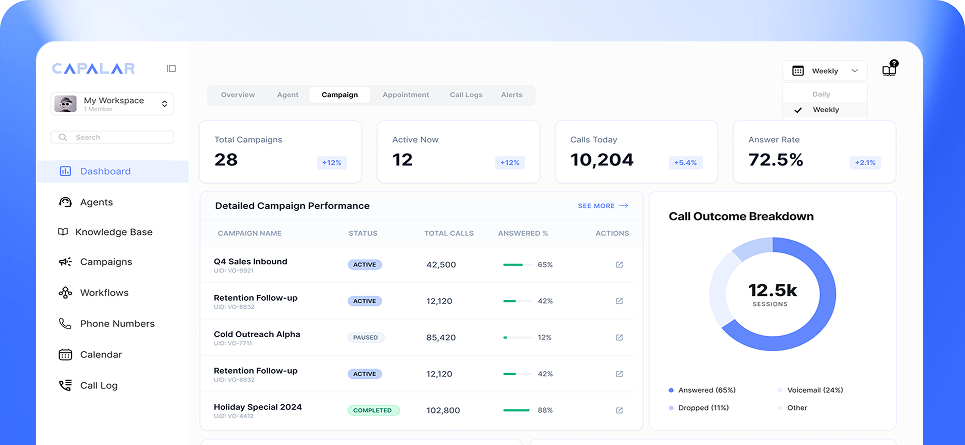
Capalar Dashboard
01

Create Your AI Agent

Setting up your AI Agent is simple:

  1. Create an account
  2. Configure your agent's preferences
  3. Define the tasks you want it to perform

Whether you're running a sales campaign or automating support, our system guides you step-by-step to ensure everything is set up the way you need it.

02

Configure Your Agent

Once your AI Agent is set up, it's time to customize:

  1. Conversation scripts
  2. Transcription settings
  3. Knowledge base inputs

You can also add:

  1. Custom prompts
  2. Greeting messages
  3. Pre-defined workflows
03

Make or Receive Calls

After configuration, your AI Agent is ready to:

  1. Initiate outbound calls
  2. Handle incoming calls
  3. Perform follow-ups based on schedules you define
04

Monitor & Optimize

Once your agent is running, use our real-time analytics tools to:

  1. Track performance
  2. Adjust scripts
  3. Fine-tune tone and responses

Optimization is continuous and seamless, ensuring your AI Agent keeps improving over time.